Security for AI coding agents.
Anyone who can file a ticket can hijack the agent. Ticinuum runs your agents on your own model credential, keeps each tenant from seeing anyone else's data, scans requests for prompt injection before they can become tickets, and makes every session revocable. It holds no security certification — no SOC 2 — and says so.
Early access ↓Security, BYOK & multi-tenancy
Your key, your quota, your data.
Each tenant runs on its own key, its own quota, and can't see anyone else's data.
- Your model key, your quota — agents run on your executor, on the model credential in its own environment — an Anthropic API key, a Claude subscription, or your own AWS Bedrock account — so their spend lands on your provider account, the control plane never holds that key, and Ticinuum adds no markup to it. Separately, the control plane's own small AI calls — drafting a ticket, the injection classifier, error explanations — can run on a key your org stores with us: write-only, encrypted with AES-256-GCM, versioned for rotation, and decrypted only in the service layer. Whether Ticinuum's key may ever serve those calls, before you add one or as a rescue if yours breaks, is a choice your org records; left unset, a broken key of yours is never silently rescued.
- Tenant isolation at the app layer — cross-tenant access returns 404 — a resource you don't own is indistinguishable from one that doesn't exist.
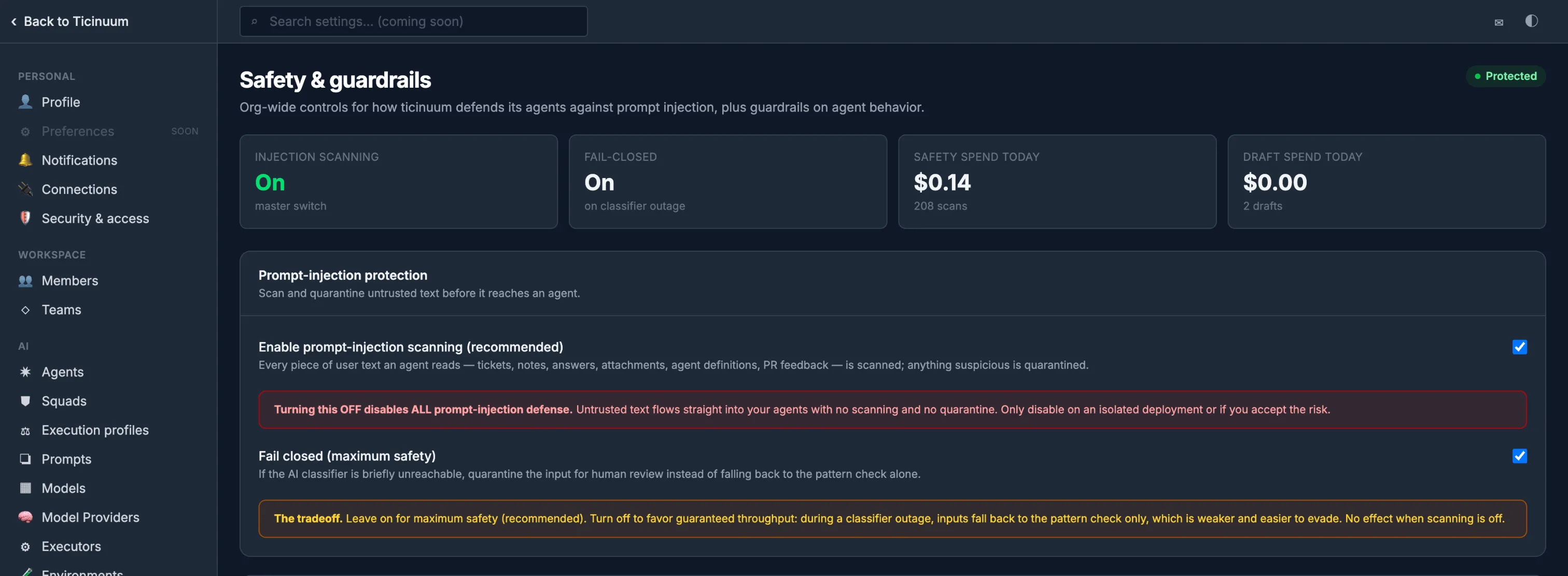
- Injection quarantine, at the door — two layers — red-teamed pattern matching plus a cross-lingual LLM classifier — scan every request before it can become a ticket, whether a teammate typed it or it arrived from Jira, Linear, a pull-request comment or your git host's issues. A hit holds the request in Intake and creates no ticket until an admin other than its author clears it (an org with no second admin records a reason instead) — never over MCP. Text added to a ticket later is scanned again before any run. If the classifier can't be reached the request waits, is re-scanned, and goes to a person only if the outage lasts an hour. (An org can opt out of scanning; it ships on.)
- Sign-in and sessions — email-first sign-in offers each address only the methods it actually has — a password, your org's SSO, a one-time link emailed to you (a platform admin can turn it off), or a passkey where your deployment enables them, with user verification on every passkey sign-in and a recent sign-in required to add or remove one — and an unrecognized address sees the same choice an ordinary password account sees. Sessions are revocable: sign out everywhere, and a password change or deactivation ends every session at once — MCP connections included; turning on SSO enforcement ends the sessions that don't comply at their next request. JWT on the API (the service refuses to start without a secret, or with the shipped placeholder); session cookies on the UI.
- Single sign-on, per org — an OrgAdmin binds an OIDC identity provider and members sign in with SSO — OIDC discovery, PKCE, and ID-token verification, with just-in-time provisioning gated on the IdP's verified email domain; where the IdP supports it, signing out signs you out there too. No global flag: the button appears once your org binds an IdP.
- Multi-org identity — identity is global — one account, one email — with a distinct role in each org and an org switcher that re-scopes the session. OrgAdmins manage members from Settings; N org-spanning root admins are a separate grant, and every change is on the audit trail.
In the product
Captured from the product.
Real screens from Ticinuum’s own organization, taken in October 2026 — not mockups.
Roadmap fence
Security: what's opt‑in, and what isn't built.
What's built but off until you turn it on, and what isn't built yet. Open any row for the whole sentence, or read the whole fence.
On the roadmap Not built yet, or built but not yet validated in use. Don't rely on these. 1 item
SecurityMulti-tenant agent sandboxing — isolated per-job execution (credential brokering & egress filtering have since landed, and on macOS an executor now confines the agent's commands to the run's workspace; Linux confinement and isolation between runs have not)
FAQ
Questions, answered plainly.
Where are my keys stored?
Your agents run on your executor, on the model credential in its own environment — an Anthropic API key, a Claude subscription, or your own AWS Bedrock account — so their spend lands on your provider account, the control plane never holds that key, and we add no markup to it. For the control plane's own small AI calls (drafting a ticket, the injection classifier, error explanations) you can store your org's key: write-only, encrypted with AES-256-GCM, versioned for rotation, decrypted only in the service layer. Whether Ticinuum's own key may serve you — before you add yours, or as a rescue if yours breaks — is a choice your org records: allow it and those calls go through our provider account with the platform fee; deny it and it's your key or nothing. Left unset, our key serves you until you add one, but never silently rescues a key of yours that breaks.
What about prompt injection?
Two layers — red-teamed pattern matching plus a cross-lingual LLM classifier — scan every request at the door, before it can become a ticket: what a teammate types, issues from Jira, Linear or your git host, and comments on a pull request. A hit holds the request in Intake and creates no ticket until an admin other than its author clears it — never over MCP. The same gate scans text added to a ticket later, what an engineer's client writes over MCP, and every answer to an agent's question. If the classifier can't be reached, the request or ticket is held and re-scanned on its own, released when the classifier is back, and put to a person only if the outage lasts an hour. Scanning ships on; an org can opt out.
Do you support SSO?
Yes. An org admin binds an OIDC identity provider — issuer, client ID, allowed domains — and members then get a "Sign in with SSO" button. There's no global flag: it appears once your org connects an IdP. New users can be just-in-time provisioned, gated on a verified email domain and a configured role, with PKCE and ID-token verification throughout; where the IdP supports it, signing out of Ticinuum signs you out there too.
How do people sign in, and can we end a session?
Sign-in is email-first: Ticinuum offers each address only the methods it actually has — a password, your org's SSO, a one-time link emailed to you (on by default; a platform admin can turn it off), or a passkey where your deployment enables them — and an unrecognized address sees the same choice an ordinary password account sees. Sessions are revocable: sign out everywhere from Settings → Security & access, and a password change or a deactivated account ends every session at once; signing out everywhere or changing your password also revokes your MCP connections. How sign-in works →
Can a whole team use it? How do roles and multiple orgs work?
Yes. Identity is multi-org: one account can belong to many organizations with a different role in each, and an org switcher re-scopes your session. Access is four tiers — system admin, org admin, member, viewer — enforced server-side; org admins invite members and change roles from Settings, and a viewer is genuinely read-only.
Are you SOC 2 certified?
No, and we won't claim a status we don't have. What's true today: state changes and their events written atomically, a hash-chained audit stream, AES-256-GCM key encryption, revocable sessions, app-layer tenant isolation (404), and a two-layer injection gate.
The rest of the deep dive
Every other guardrail, on its own page.
- AI cost controls Autonomy you can afford.
- Audit trail Every diff, decision, token, and dollar — on the record.
- Human-in-the-loop Humans approve only where policy requires.
- Data residency Choose what lands where.
- Claude Code & MCP Your engineers' sessions join the record.
- The deep dive All six on one page, with the roadmap and the comparison.
Put your backlog on the continuum.
From intent to PR to review — one durable, auditable continuum of work. Early access opens soon.
coming soon
Early access opens once the waitlist terms and privacy notice are final. Nothing to sign up for yet — this page collects no email.